
7 Common Blogging Mistakes That Keep New Blogs From Getting Traffic
So, you finally started your blog. You chose a domain, picked a theme, created your main pages, wrote a few articles, and finally hit Publish. Then you waited for the visitors to come. But… nothing happened.
No Google traffic. Barely any clicks. Maybe a few visits from friends or people you already know. If that sounds familiar, don’t assume your blog is failing.
Getting traffic to a new blog usually takes time. However, some common blogging mistakes can make it much harder for a new website to get noticed. The good news is that you don’t have to start everything from scratch.
In many cases, fixing a few basic problems can make your content easier to discover, easier to read, and more useful to your target audience.
Here are 7 common blogging mistakes that can keep a new blog from getting traffic—and what you can do instead.
7 Common Blogging Mistakes
1. Targeting High-Competition Keywords Instead of Long-Tail Keywords
One of the biggest mistakes new bloggers make is trying to rank for huge keywords right away. Imagine you’ve just started a home decor blog.
You might decide to write an article targeting:
“Living Room Decor”
Sounds like a great topic, right? The problem is that it’s extremely broad.
You’re likely competing with established websites, major publications, large retailers, and websites that have been publishing content for years.
The same problem can happen with topics such as:
- Best fashion trends
- Make money online
- Healthy recipes
- Home workouts
- Blogging tips
- Interior design
These aren’t bad topics. They’re simply very broad, and a brand-new website may have a harder time competing for them.
The Fix: Start With More Specific Topics
Instead of targeting a huge keyword, make the topic more specific.
For example:
Instead of:
Living room decor
Try:
Budget-friendly apartment living room decor ideas
Instead of:
Blogging tips
Try:
Easy SEO tips for new bloggers
Instead of:
Indoor plants
Try:
Low-maintenance indoor plants for small apartments
These longer, more specific searches are often called long-tail keywords. They don’t guarantee that you’ll rank on the first page of Google. However, they can help you focus on a much more specific search need. There’s another advantage too.
When someone searches for something very specific, you have a better idea of what they’re actually looking for.
Instead of trying to answer everything about “living room decor,” you can create an article specifically for someone looking for affordable ideas for a small apartment.
Start specific. Build authority around smaller topics. Then work your way toward broader keywords as your site grows.
I actually discuss keywords in all of my blogging articles because they’re one of the most important parts of blogging. So, don’t take keyword research lightly. If you’re not targeting the right long-tail keywords, believe me, you’re going to have a really hard time ranking.
2. Writing Like an Academic Essay
You might know a lot about your subject, but your blog doesn’t need to sound like a college textbook. Most people don’t read online articles word-for-word. They scan.
They look at the title, headings, images, bold text, lists, and the first few paragraphs to decide whether the article is worth their time.
If they open your article and see huge blocks of text with complicated sentences, they may leave before finding the information they actually need.
The Fix: Make Your Content Easy to Scan
Write like you’re explaining something to another person.
Use:
- Short paragraphs
- Clear H2 and H3 headings
- Bullet points
- Numbered lists
- Examples
- Bold text where useful
- Images when they actually add value
- Simple, conversational language
For example, instead of writing:
“The implementation of a comprehensive internal linking strategy facilitates improved navigational accessibility for website visitors.”
You could simply say:
“Internal links help readers find more useful content on your site.”
Same basic idea. Much easier to understand. Your goal isn’t to sound complicated. Your goal is to make the reader understand the answer without working too hard for it.
This doesn’t mean every paragraph has to be one sentence long. It simply means you should make the article comfortable to read.
3. Ignoring Search Intent
You can choose a keyword with good potential and still create the wrong type of article. Why? Because you didn’t consider search intent.
Search intent simply means understanding what someone actually wants when they search for something.
For example, imagine someone searches:
“easy chocolate cake recipe”
They probably want:
- Ingredients
- Instructions
- Baking time
- Temperature
- Helpful tips
They probably don’t want to read five paragraphs about the history of chocolate before seeing the recipe.
Now imagine someone searches:
“best budget laptops for students”
They’re probably looking for comparisons, recommendations, specifications, or buying advice. They’re not looking for a basic explanation of what a laptop is.
The Fix: Check Google Before You Write
Before writing an article around an important keyword, search the topic on Google. Look at the pages appearing near the top.
Ask yourself:
- Are most results listicles?
- Are they tutorials?
- Are they detailed guides?
- Are they product comparisons?
- Are they short answers?
- What questions do these pages answer?
- What information appears repeatedly?
You don’t need to copy those articles. Instead, use the search results to understand what type of content people are expecting.
Then create your own article that answers that search need clearly and, where possible, adds useful information that readers may still be looking for. And don’t make people wait forever for the answer.
If your article promises to solve a problem, give readers a useful answer early and then explain the details.
4. Relying Only on Google for Traffic
Google can be an important traffic source for a blog, but you don’t have to depend on it alone. A new website may take time to build search visibility, especially when it doesn’t have many established pages or backlinks.
That’s why it can make sense to work on other traffic sources at the same time.
The Fix: Promote Your Content on Pinterest
Pinterest can be particularly useful for visual niches such as:
- Fashion
- Home decor
- Beauty
- Recipes
- DIY
- Travel
- Weddings
- Lifestyle
Pinterest works differently from a traditional social network. People often use it to discover ideas, inspiration, products, tutorials, and other content. And a Pin can send someone directly to your website. You don’t need thousands of followers to start.
I actually started getting solid traffic in my first month despite having under 50 followers. Follower count doesn’t matter much on Pinterest.
For each useful blog post, you can create different Pin designs using:
- A clear headline
- A relevant image
- Your website name
- A strong visual layout
- A description related to the article
For example, suppose you have an article about small bedroom ideas.
You could create different Pins focusing on different angles:
- Small Bedroom Ideas That Make a Room Feel Bigger
- 15 Cozy Small Bedroom Ideas
- Small Bedroom Decor Ideas on a Budget
All three Pins can lead to the same article while presenting the topic from slightly different angles.
The important thing is that the Pin should accurately represent the content people will find after clicking.
Pinterest isn’t a replacement for Google SEO. It’s simply another way to put your content in front of potential readers while your organic search presence develops.
Related : How Long Does It Take for a New Blog to Get Google Traffic? A Realistic SEO Timeline
5. Forgetting Internal Links
Imagine someone discovers your blog through one of your articles. They read the entire post.
Now what?
If there are no useful links to other relevant articles on your site, they may simply close the page and leave. This is where internal linking becomes important.
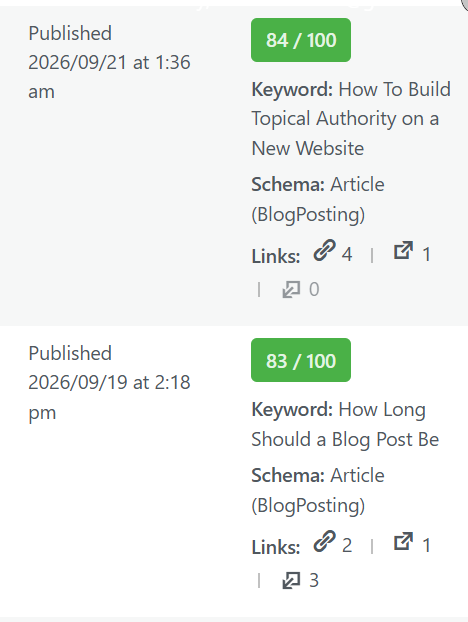
Sometimes, I honestly forget about internal linking too. But I found a simple trick that helps me spot these missed opportunities, just like the one shown in the screenshot.
As you can see, this article has 4 links pointing to other related posts, but don’t have any links from other posts pointing back to this one. Once you spot something like this, you can easily fix it by adding a few relevant internal links from your other articles.
Whenever you publish a new article, look through your older content and ask:
“Do I already have another article that would help someone reading this?”
If the answer is yes, add a natural internal link.
For example, if you’re writing about: Neutral Street Style Outfits
you might link to: Minimalist Capsule Wardrobe Essentials
Or if you’re writing about: Indoor Shelf Plant Decor
you could naturally link to: Faux Plants for Bedroom Decor
Here, I’m using the home decor niche as an example. You can do the same thing with your own niche and interlink your related posts.
The important word is relevant. Don’t add random internal links just to increase the number of links on a page. Your links should make sense and help the reader discover something useful.
Internal links can also help search engines discover other pages on your website and understand how your content is connected.
A simple habit can make this much easier:
Whenever you publish a new post, check 3–5 older articles and look for natural places where your new article could be linked. And don’t only link from new posts to old posts. Go back to relevant older articles and add links to your newer content too. as i have shown you up in the screenshot
Whenever you publish a new post, check 3–5 of your older articles and look for natural opportunities to link to your new article. And don’t only link from new posts to old posts. Go back to relevant older articles and add links to your newer content as well, as I’ve shown in the screenshot above.
6. Skipping Basic On-Page SEO
You don’t need to become an SEO expert to optimize a blog post. You also don’t need complicated technical knowledge for the basics.
But completely ignoring on-page SEO can make your content less clear for both readers and search engines.
The Fix: Use a Simple On-Page SEO Checklist
Before publishing an article, check these basics.
1. Write a Clear Title
Your title should tell readers what the article is about.
For example:
21 Neutral Street Style Outfits for Women Who Love Minimalist Fashion
is much clearer than:
My Favorite Fashion Looks Right Now
The first title gives both readers and search engines a much clearer idea of what the page covers.
2. Keep Your URL Simple
Use a short and descriptive URL whenever possible.
For example:
yoursite.com/neutral-street-style-outfitsis cleaner than a long URL containing unnecessary words and numbers.
3. Use Clear Headings
Break your article into logical sections with H2 and H3 headings. This makes long content easier to scan and helps organize the information on the page.
Most importantly, don’t forget to add a table of contents to your article, as it helps readers scan through the content easily.
4. Use Your Main Topic Naturally
Your main keyword or topic can appear naturally in places such as:
- The title
- Introduction
- Relevant headings
- Body content
- URL when appropriate
But don’t force the exact keyword into every paragraph. Keyword stuffing doesn’t make an article better. Write naturally and focus on covering the topic properly.
5. Write Useful Image Alt Text
Alt text should describe what the image actually shows.
For example:
“Woman wearing a beige trench coat with wide-leg denim on a city street.”
If your target topic fits naturally into the description, that’s fine. But don’t stuff keywords into alt text just because you think it will improve rankings.
The purpose of alt text is to provide a useful text description of the image.
6. Make the Page Easy to Navigate
Use:
- Short sections
- Descriptive headings
- Lists
- Relevant internal links
- Helpful images
Good on-page SEO isn’t about putting keywords everywhere. It’s about making the page clear, useful, and easy to understand.
7. Giving Up Too Soon
This may be the hardest blogging mistake to avoid. You publish five articles. Then ten. You check your analytics. Almost no traffic.
You start thinking:
“Maybe blogging doesn’t work anymore.”
That was my situation too. I used to check my website every day and see no traffic, but later I discovered that it actually takes time for a new website to start getting traffic. A new website usually doesn’t become an established source of search traffic overnight.
You need time to:
- Publish useful content
- Build topical coverage
- Understand your audience
- Improve older articles
- See which topics attract impressions
- Build a larger collection of relevant pages
That doesn’t mean you should blindly publish hundreds of articles and hope something works. You should pay attention to what your data is telling you.
The Fix: Choose a Schedule You Can Actually Maintain
Don’t create a publishing schedule that sounds impressive but becomes impossible after two weeks.
If you can realistically publish:
1 quality article per week
then do that.
If you can consistently publish:
2 useful articles per week
that’s fine too.
Consistency is more useful than creating an unrealistic schedule and quitting shortly afterward. And don’t judge your entire blog based on the first few weeks. Instead, look at your progress over time.
Ask:
- Are more pages getting indexed?
- Are impressions increasing?
- Are some keywords starting to appear?
- Are older posts getting clicks?
- Are Pinterest impressions increasing?
- Are Pinterest outbound clicks increasing?
- Which topics are getting the most interest?
- Which articles need improvement?
Use that information to make better decisions about your next articles. Blogging isn’t only about publishing new content. It’s also about learning from the content you’ve already published.
Frequently Asked Questions
How long does it take a new blog to get traffic?
There isn’t one exact timeline.
It can depend on your niche, competition, content quality, website history, search demand, and how consistently you publish and improve your content. Some pages may start receiving impressions relatively early, while meaningful traffic can take much longer.
Instead of expecting a specific number of days, watch how your impressions, rankings, clicks, and indexed pages change over time.
Should new bloggers focus on long-tail keywords?
Long-tail keywords can be a practical starting point because they are more specific than broad keywords. They don’t guarantee rankings, but they can help a new blogger focus on specific questions and topics rather than competing immediately for extremely broad searches.
How many blog posts should a beginner publish each week?
There is no universal number. One useful, well-researched article per week can be better than publishing several rushed articles that don’t provide much value. Choose a schedule you can maintain without sacrificing quality.
Can Pinterest help a new blog get traffic?
Yes, Pinterest can be another traffic source, particularly for visually driven niches such as fashion, home decor, recipes, beauty, and lifestyle. However, results can vary, and Pinterest should be treated as a separate traffic channel rather than a replacement for search engine optimization.
What is the biggest mistake new bloggers make?
There isn’t one mistake that affects every new blog. However, common problems include targeting topics that are too competitive, ignoring search intent, creating difficult-to-read content, neglecting internal linking, skipping basic SEO, and giving up before collecting enough data to understand what is working.
Final Thoughts
Starting a blog can feel frustrating when you spend hours writing an article and almost nobody seems to notice it. But low traffic doesn’t automatically mean your blog is bad.
Sometimes the problem is simply that you’re targeting topics that are too competitive. Sometimes you’re answering the wrong search intent. Other times, your content may be difficult to scan, poorly connected to the rest of your site, or dependent on a single traffic source.
Start with the basics.
- Choose more specific topics.
- Write for real people.
- Understand what searchers actually want.
- Create useful internal links.
- Take care of basic on-page SEO.
- Promote your content through other relevant channels.
- And give your website enough time to collect data and improve.
Most importantly, don’t expect every article to bring traffic immediately.
Keep publishing useful content, study what happens, improve older posts, and let your blog become stronger one article at a time.
If you’re building a new blog right now, save this guide and use these 7 blogging mistakes as a quick checklist whenever you publish a new post.